Appliance Energy Label Photo OCR Cleanup for Property Managers
A practical guide for turning appliance energy label photos into readable, searchable records for rentals, audits, replacements, and maintenance planning.

Appliance Energy Label Photo OCR Cleanup for Property Managers
Appliance energy labels are easy to ignore until someone needs one quickly. A refrigerator replacement request, a utility disclosure question, a rebate submission, a furnished rental inventory, an insurance file, or a portfolio-wide efficiency review can all depend on a small sticker that was photographed in bad light six months ago.
For property managers, the problem is rarely one missing photo. The harder problem is consistency. One technician captures the whole refrigerator door from across the room. Another takes a close-up that cuts off the model number. A third sends a blurry image through a messaging app that compresses it beyond recognition. By the time the office needs to search for a model, annual energy figure, serial detail, or unit location, the folder is full of images that look useful but are not actually dependable.
This guide explains how to turn appliance energy label photos into clean, searchable records. It is written for rental portfolios, furnished apartments, student housing, short-term rental operators, maintenance coordinators, and small facility teams that need practical records without buying specialist asset management software. The goal is simple: capture the label clearly, clean the image without damaging evidence, extract the text where useful, and assemble a packet that someone else can understand later.
The examples focus on refrigerators, freezers, dishwashers, washers, dryers, air conditioners, and dehumidifiers, but the same method works for many appliance stickers and compliance plates. You can use ConvertAndEdit tools such as Image OCR, Resize Image, Compress Image, and Image to PDF to prepare the records without turning a small administrative task into a software project.
Why Energy Label Photos Fail as Records
Energy labels look simple, but they are awkward source material for OCR and recordkeeping. They are often glossy, curved, partly shaded, or mounted inside a door recess. The label may include large numbers, small legal text, icons, tables, barcodes, certification marks, and multiple model references. A human can usually interpret a decent photo. Search software is less forgiving.
The most common failures are predictable:
- The label is photographed at an angle, turning rectangular text into a trapezoid.
- Flash glare covers the efficiency figure or model line.
- The image includes too much background, so the label text becomes tiny.
- The photo is sent through chat apps before archiving, causing compression artifacts.
- The file name says IMG_4821 instead of the unit, room, and appliance.
- Multiple labels are mixed into one folder without a cover sheet or index.
- OCR picks up brand graphics, icons, or nearby stickers as if they were useful text.
The fix is not to chase perfect scans. In rental operations, speed matters. The right standard is a photo that is clear enough for a person, structured enough for OCR, and packaged well enough for a future teammate to trust.
Define the Record Before Taking Photos
Before asking technicians or leasing staff to photograph labels, decide what the final record must answer. A useful appliance label packet usually needs to answer six questions:
| Question | Why it matters | Where it appears |
|---|---|---|
| Which property and unit is this? | Prevents labels from drifting into the wrong file | Cover sheet, filename, folder name |
| Which appliance is shown? | Separates fridge, washer, dryer, AC, and dishwasher records | Filename and page order |
| What model or product number is visible? | Helps with replacement parts and warranty checks | Label photo and OCR text |
| What energy figure is shown? | Supports utility, efficiency, or rebate review | Energy label photo |
| When was the photo captured? | Helps prove the record reflects a specific inspection | Metadata, filename, or packet note |
| Is the image readable without zooming heavily? | Makes the record usable by non-technical staff | Cleaned image and PDF packet |
Once you know the answers you need, you can set capture rules that are short enough for field staff to follow.
A good naming pattern is more valuable than people expect. Use a predictable structure such as:
property-unit-room-appliance-label-date
For example:
oak-014-kitchen-refrigerator-energy-label-2026-06-30.jpg
This is not about neatness for its own sake. Searchable file names rescue you when OCR is imperfect, when a label is partly unreadable, or when a PDF is split later.
The Capture Standard: What Every Label Photo Needs
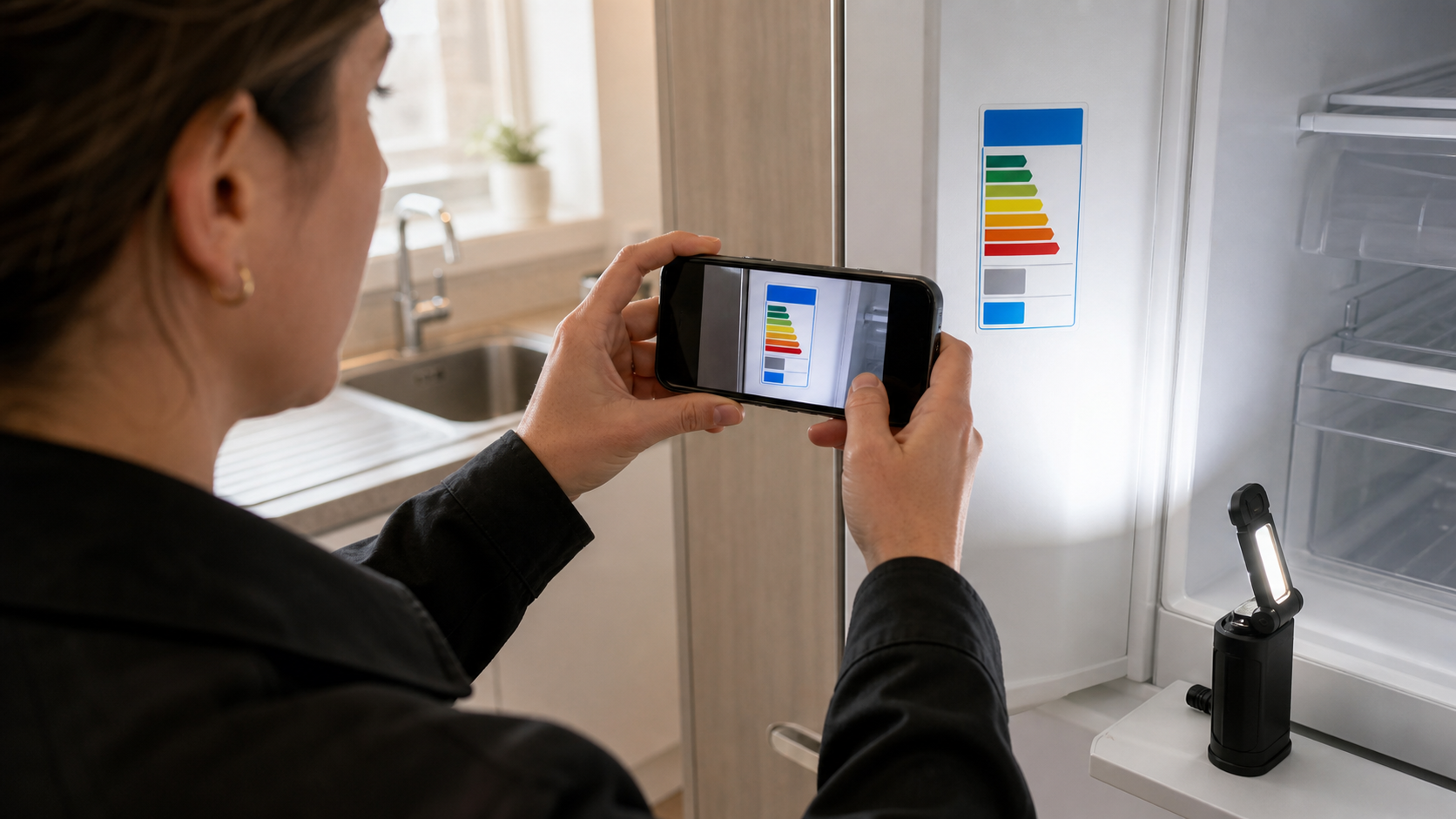
The best cleanup step happens before editing: take a better source photo. A phone camera is usually enough if the person capturing the label follows a repeatable standard.
Use this field checklist:
- Wipe dust or condensation from the label area if it is safe to do so.
- Hold the camera parallel to the label, not above or beside it.
- Fill most of the frame with the label while leaving a small border around it.
- Tap to focus on the small text, not on the appliance surface.
- Avoid flash if it creates glare; use angled room light or a small flashlight instead.
- Take one close label photo and one wider context photo showing the appliance location.
- Retake immediately if the model number, efficiency figure, or label title is soft.
For glossy labels, the trick is to move the light, not the camera. Keep the phone square to the sticker, then shift your light source to the side until glare moves away from the important lines. If the label is inside a refrigerator, open the door fully and block mixed reflections from windows when possible.
Do not over-crop in the camera app. Leave a modest margin around the label so later corrections can straighten the image without cutting off edges. If the photo includes too much background, crop it afterward with a calmer eye.
Capture One Context Photo
A close-up label image is excellent for OCR, but it can become detached from reality. Add a second photo that shows the appliance in its room or installation position. The context photo does not need OCR. It answers the practical question: what appliance was this label attached to?
For a portfolio with many similar units, this context shot prevents avoidable confusion. Two refrigerators from the same brand may have similar labels. A wider photo showing the kitchen layout, appliance finish, or adjacent cabinetry can help confirm that the record belongs to the right unit.
Clean the Photo Without Changing the Evidence
The purpose of cleanup is readability, not beautification. For property records, avoid edits that could make someone question whether the label content was altered. Do not repaint digits, replace text, clone away label damage, or use heavy stylization. Keep the original photo in an archive folder, then create a cleaned copy for OCR and PDF assembly.
A practical cleanup sequence looks like this:
| Step | Action | Tool option |
|---|---|---|
| 1 | Duplicate the original image | Local file manager |
| 2 | Crop to the label plus small border | Resize Image if resizing is also needed |
| 3 | Straighten or rotate so lines run horizontally | Image editor or camera gallery |
| 4 | Improve brightness and contrast gently | AI Photo Editor for careful cleanup requests |
| 5 | Export a clean JPG or PNG | Convert Image if format needs standardizing |
| 6 | Run OCR and review the extracted text | Image OCR |
If you use an AI editing tool, phrase the request conservatively. Ask for glare reduction, contrast improvement, and dust cleanup while preserving all printed characters and label layout. Do not ask it to reconstruct missing text. If a number is unreadable, mark it as unreadable in your notes rather than guessing.
What Not to Fix
Some imperfections should remain visible. Scratches, tears, faded ink, and partial obstruction may be relevant. If a label is damaged, the record should show that damage. You can include a note in the packet such as energy figure partly obscured by abrasion or serial line not readable in source photo.
The same rule applies to brand marks and regulatory icons. You may not care about them for OCR, but they help establish that the photo is a real label. Crop tightly enough for readability, but not so tightly that the image loses context.
OCR the Useful Text, Then Treat It as Draft Data
OCR is a strong assistant, not a final authority. Appliance labels often contain stylized numbers, condensed fonts, icons, and multilingual text blocks. The OCR output may confuse 0 and O, 1 and I, or pick up decorative text from certification marks.
Use Image OCR to extract searchable text from the cleaned label image. Then review the output against the photo. For each appliance, capture the fields that matter most:
- Property and unit
- Room or appliance location
- Appliance type
- Brand, if clearly visible
- Model number or product number
- Serial number, if present and needed
- Energy consumption figure, if relevant
- Capacity or size, if shown
- Photo date
- Review status
A simple review status prevents messy records from pretending to be complete. Use labels such as:
| Status | Meaning | Next action |
|---|---|---|
| Verified | Key fields match the image | Add to packet |
| Partial | Some fields readable, others unclear | Add note and keep source photo |
| Retake needed | Main label text is not dependable | Send back to field team |
| Not applicable | Appliance has no relevant label | Add context note |
The strongest habit is to separate OCR text from verified data. OCR output can live in the PDF or notes, but your final index should only contain fields that a person checked.
Decide Between JPG, PNG, and WebP for Label Records
For internal records, format choices should be boring. Choose the format that preserves readability and opens easily for the people who need it.
| Format | Best use | Watch out for |
|---|---|---|
| JPG | Most phone photos and general archiving | Repeated saving can add artifacts around tiny text |
| PNG | Screenshots, crisp text images, edited label crops | Larger files than JPG for camera photos |
| WebP | Smaller web-ready copies or internal portals | Some legacy systems may not preview it cleanly |
| Final packet for sharing, review, and archiving | Poor page order or missing index can reduce usefulness |
For most property teams, keep original phone JPGs, create cleaned JPG or PNG copies, and assemble the reviewed set into a PDF. If your portal requires a specific upload format, use Convert Image to standardize copies without touching the original archive.
Avoid saving the same label photo repeatedly as JPG during editing. Each export can soften edges around small letters. Make your edits once, export once, then use that copy for OCR and packet assembly.
Build the Searchable Packet

A packet is more useful than a folder of loose photos when someone outside the original capture team needs to review the material. A clean packet can be attached to an email, stored with lease documents, uploaded to a maintenance ticket, or sent to an owner.
Use Image to PDF to combine the cleaned label photos and context photos into a single PDF. A practical order is:
- Cover page or first image with property and unit reference.
- Kitchen refrigerator context photo.
- Kitchen refrigerator energy label close-up.
- Dishwasher context photo.
- Dishwasher energy label close-up.
- Laundry appliance context photos and labels.
- HVAC or portable AC label photos.
- Notes page or exported OCR text, if needed.
If you are building records for many units, create one packet per unit rather than one huge property-wide file. Unit-level packets are easier to update, attach to tickets, and replace when appliances change.
Add OCR Text Where It Helps
A PDF made only of images may look organized but still be hard to search. If your document system supports searchable PDFs, include OCR text in the record. If not, add a short plain-text index at the beginning or end of the packet. The index can be simple:
| Appliance | Model | Energy figure | Photo status |
|---|---|---|---|
| Refrigerator | Verified from label | Verified from label | Verified |
| Dishwasher | Verified from label | Not shown | Partial |
| Washer | Unreadable | Not shown | Retake needed |
Do not bury uncertainty. A packet that clearly says retake needed is more useful than a neat-looking packet with silent gaps.
Compression Rules for Small Text
Compression is tempting when packets get large, especially when a property manager has to email records or upload them to a portal. But energy labels contain exactly the kind of small, high-contrast text that bad compression damages.
Use Compress Image carefully. The goal is to reduce unnecessary file size while preserving the smallest important line. After compression, zoom in and check the hardest part of the label: usually the model number, serial number, or fine-print energy table.
A sensible rule is:
| Use case | Recommended approach |
|---|---|
| Long-term archive | Keep original images plus cleaned copies |
| Email attachment | Compress copies, not originals |
| OCR source image | Use the clearest cleaned image, not the smallest one |
| Owner review PDF | Compress enough for delivery, then inspect key fields |
| Portal thumbnail | Create a smaller derivative image, clearly separate from record copy |
If compression creates fuzzy blocks around letters, halos near black text, or broken digits, back off. A slightly larger file is cheaper than a mistaken appliance record.
A Practical Naming and Folder System
Many record problems are folder problems disguised as image problems. If every technician uploads images into one shared dumping ground, even good photos become hard to use.
A lightweight structure is enough:
Property / Unit / Appliances / YYYY-MM inspection / originals
Property / Unit / Appliances / YYYY-MM inspection / cleaned
Property / Unit / Appliances / YYYY-MM inspection / packet
Inside those folders, use consistent filenames:
oak-014-kitchen-refrigerator-context-2026-06-30.jpg
oak-014-kitchen-refrigerator-energy-label-clean-2026-06-30.png
oak-014-appliance-label-packet-2026-06-30.pdf
The word clean should mean readability edits only. It should not mean that content was reconstructed. Keep originals nearby so the cleaned version can always be checked against the source.
Quality Control Checklist Before Sharing
Before sending a packet to an owner, auditor, maintenance vendor, or internal reviewer, run a quick quality check. This takes less time than answering follow-up questions later.
Use this checklist:
- The H1 or cover reference matches the property and unit.
- Every label close-up has a matching context photo where needed.
- The appliance type is clear from filename or page order.
- The model number is readable in the image or marked as unreadable.
- OCR text has been reviewed for obvious character mistakes.
- Compressed copies still show small text clearly.
- The PDF pages are in a predictable order.
- The packet does not include unrelated resident information.
- Originals are stored separately from cleaned copies.
- Any uncertainty is written as a note, not hidden.
Resident privacy deserves special attention. Context photos may accidentally include mail, personal items, medication, calendars, or reflections. Crop or retake context images if they reveal unnecessary private information. For label close-ups, keep the frame tight enough to avoid the surrounding living space.
Common Edge Cases
Curved Refrigerator Labels
Some labels sit on curved interior surfaces or textured plastic. If the text bends slightly, OCR may struggle. Take the photo from farther back with optical zoom if available, keeping the phone parallel to the central plane of the label. A slightly wider, sharper photo is often better than an extreme close-up with distorted edges.
Labels Behind Drawers or Shelves
Do not force parts or remove panels unless the person is trained and allowed to do so. Take the best accessible photo and mark the record as partial if needed. A safety-first partial record is better than damage or injury.
Multiple Stickers Near Each Other
Appliances often have an energy label, a serial plate, a warning sticker, and a retailer barcode. Capture the energy label separately from the serial plate if both matter. Separate images improve OCR and reduce confusion in the final packet.
Dark Utility Rooms
For washers, dryers, water heaters, and dehumidifiers, lighting is often the main problem. Use a small side light rather than direct flash. If the label is metallic, direct flash can erase the very line you need.
Chat-App Images
If a technician already sent a photo through a chat app, ask whether the original still exists on the phone. Chat apps often resize images aggressively. For OCR, the original camera file is usually much better than the forwarded copy.
When a Retake Is Worth It
Retakes cost time, so it helps to define the threshold. Ask for a retake when the missing information could change a decision.
A retake is usually worth it if:
- The model number is unreadable.
- The energy consumption figure is unreadable and needed for review.
- The label is cut off on one side.
- Glare covers a key table or number.
- The image is too compressed for OCR and human review.
- The photo cannot be tied to a specific unit or appliance.
A retake may not be necessary if only legal fine print is soft, the context photo is imperfect but the label is clear, or the appliance is being replaced and the record is only for a short maintenance note.
The decision should match the use case. A rebate packet needs stricter evidence than an internal replacement planning note.
A Small Team Playbook
For a small property team, the best system is one that people will actually follow. Start with one inspection route or one building rather than the entire portfolio.
Try this practical system:
- Create the folder structure before the inspection.
- Give field staff a one-page capture checklist.
- Require one context photo and one label close-up per appliance.
- Rename files the same day while the unit is still fresh.
- Clean only the images that need readability help.
- Run OCR on label close-ups and verify key fields.
- Build a unit-level PDF packet.
- Compress only the sharing copy.
- Store originals, cleaned images, OCR notes, and packet together.
- Mark retakes clearly and resolve them before closing the inspection.
This is intentionally plain. The value comes from repeatability. Once the team has processed a few units, the capture and review pattern becomes fast.
Final Thoughts
Appliance energy label photos are small records with outsized value. They help property teams answer replacement questions, support documentation requests, compare appliance inventory, and avoid repeat visits for details that could have been captured once.
The key is to treat each label photo as evidence first and an image second. Keep the original, clean for readability, verify OCR before relying on it, and package the result so another person can understand it without asking the photographer what happened.
With a few consistent habits and the right lightweight tools, a messy camera roll can become a dependable appliance record set: searchable, readable, and ready when the next maintenance or compliance question arrives.