Rental Key Tag Photo OCR Cleanup for Property Handover Logs
A practical guide for turning messy rental key tag photos into readable OCR notes, searchable PDFs, and cleaner property handover records without losing context.

Rental Key Tag Photo OCR Cleanup for Property Handover Logs
Key tags are tiny, ordinary objects until a property handover goes wrong. A missing basement key, a faded unit number, a shared mailbox key with two different labels, or a photo taken under harsh office lighting can turn a simple handoff into a long email chain. Property managers, leasing coordinators, maintenance leads, short-term rental hosts, and small facilities teams often photograph key rings during move-ins, move-outs, contractor handoffs, and portfolio audits. Those photos become evidence, but they are rarely easy to search.
The problem is not only whether the tag is visible. The real issue is whether someone can later answer practical questions quickly: Which keys were handed to the tenant? Did the photo show two garage remotes or one? Was the storage locker tag marked B12 or 812? Which image belongs to which unit? A clean photo set and a readable OCR pass can make those answers easier to find.
This guide explains how to prepare rental key tag photos for OCR, how to correct the common capture problems that confuse text extraction, and how to package the result into a handover record that is useful months later. The goal is not to create a beautiful catalog. It is to create boring, clear, reliable documentation.
Why Key Tag OCR Deserves Its Own Checklist
Key tag photos look simple, but they combine several OCR-hostile details in one small image. The text is often handwritten, curved, faded, partially covered by the metal key ring, or printed on shiny plastic. A single photo may include several tags with different orientations. The camera might focus on the keys instead of the label. The tag may be white, yellow, red, or translucent, which changes contrast and glare. If the photo is taken on a dark desk, a reflective countertop, or a patterned carpet, OCR has even more visual noise to ignore.
For property teams, these small defects matter because key records are operational records. They help resolve disputes, support security checks, and reduce confusion between tenants, contractors, cleaners, and maintenance staff. A searchable note extracted from each photo is far faster than opening twenty image files and zooming into every tag.
A strong key tag record usually has three parts:
- A clear original photo that preserves context.
- A cleaned or cropped version optimized for reading.
- A searchable text note or PDF packet that connects the photo to the unit, date, and handover event.
ConvertAndEdit tools can support each part. You might use Image OCR to extract readable text, AI Photo Editor to improve visibility when the image is difficult, Resize Image to standardize large phone photos, Compress Image to reduce packet size, and Image to PDF to assemble a handover file.
What Makes Key Tag Photos Hard to Read
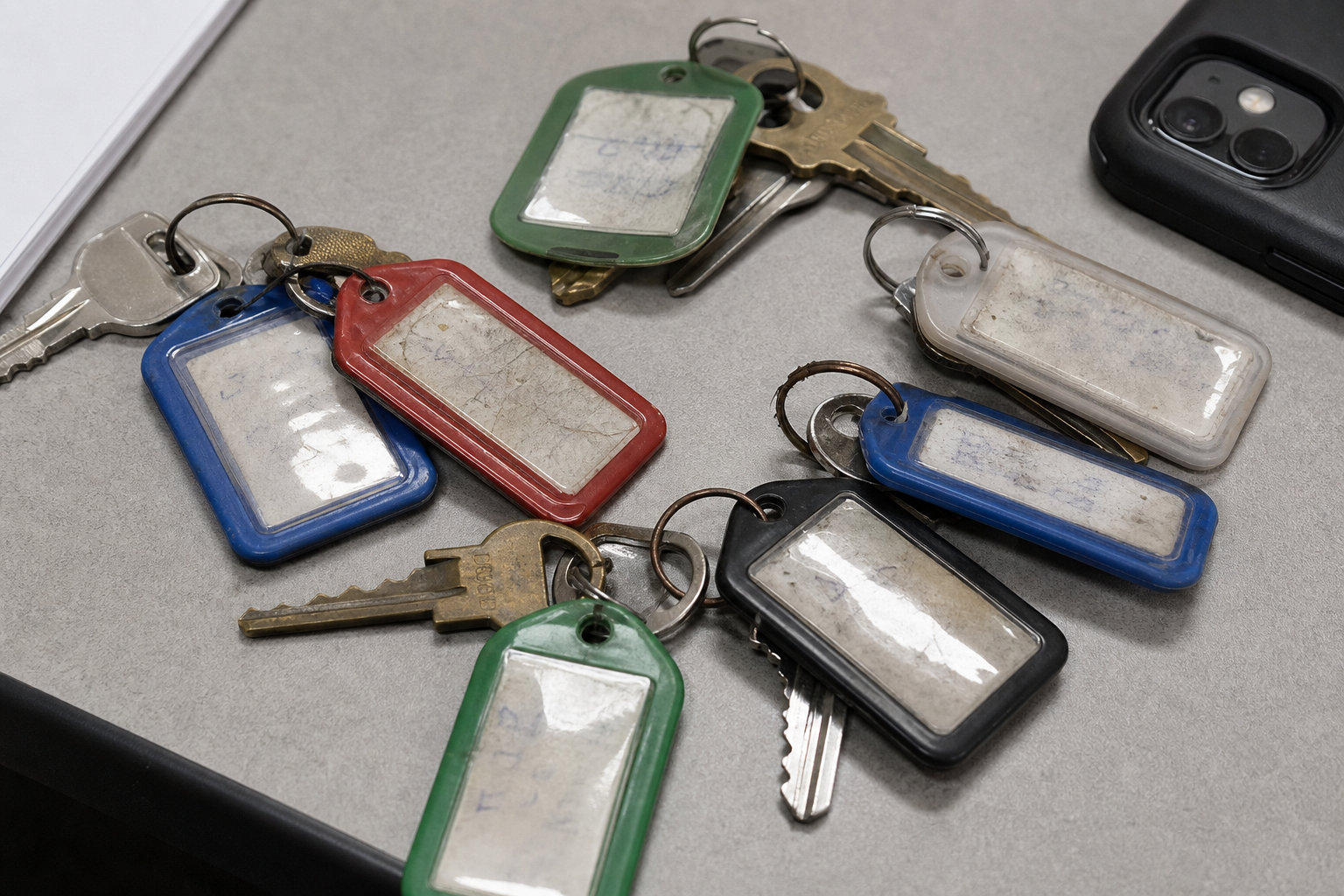
A key tag photo is usually messy in ways that normal document scanning is not. Before running OCR, it helps to understand which visual defects create the biggest risk.
| Photo issue | Why it matters | Practical correction |
|---|---|---|
| Glare on plastic tags | Bright reflections can erase numbers or letters | Retake from a slight angle or reduce highlights before OCR |
| Small handwritten text | OCR may misread 1, I, 7, T, 8, B, O, and 0 | Crop closer and verify manually |
| Multiple tags in one image | OCR may merge labels or read them in the wrong order | Use a numbered capture pattern or crop each tag group |
| Keys covering labels | Physical obstruction cannot be fixed reliably later | Rotate the key ring and retake |
| Low contrast labels | Faded marker or pale stickers blend into the tag | Increase contrast carefully, then run OCR |
| Background clutter | Receipts, forms, desks, and lanyards create false text | Use a plain background and crop tightly |
| Blurred close-ups | Small text disappears even if the overall photo looks fine | Retake with focus locked on the tag, not the keys |
The most important point is that OCR cleanup starts before software. A fast retake often beats a difficult repair. If a tag number is physically hidden, no cleanup tool can prove what was behind the key. If the photo is badly blurred, sharpening may make it look more legible to a person while still producing unreliable OCR.
When in doubt, keep the original photo and create a corrected copy. The original preserves evidence. The corrected copy improves reading. Mixing those roles can create confusion later, especially if several people review the handover file.
Capture the Key Ring Before You Edit
A reliable capture habit reduces most cleanup work. You do not need a studio setup. You need consistency.
Use a plain, matte surface. A sheet of white or light gray paper works well for most keys. Avoid glossy desks, patterned carpets, granite countertops, and dark wood with heavy grain. These backgrounds create shadows and shapes that make small labels harder to isolate.
Place the key ring so each tag is visible. If the ring has many keys, fan the tags outward and take multiple photos instead of forcing everything into one crowded image. For a large building set, divide photos by purpose: unit entry, mailbox, storage, garage, common areas, mechanical rooms, and remotes.
Keep the camera parallel enough to reduce distortion, but not so flat that overhead lights reflect directly into plastic tags. A slight angle often reduces glare. Tap the phone screen on the label before taking the photo so the camera focuses on the tag text. Take a second photo from a slightly different angle if the tag is shiny.
A useful capture set for each handover is:
- Full key ring photo showing all keys together.
- Close-up of each labeled tag group.
- Separate photo for remotes, fobs, or access cards.
- Optional context photo of the sealed envelope, key box slot, or handover sheet.
This may sound like extra work, but it prevents the classic problem of a perfect close-up with no proof of which key ring it belonged to. The full-ring image gives context. The close-ups give readable detail.
Name Files So Search Still Works Without OCR
OCR is useful, but filenames are your first fallback. A folder full of images named IMG_4082.jpeg is fragile. If OCR misses a label or a PDF is split from its notes, the filename should still identify the record.
Use a compact naming pattern that your team can repeat:
| Field | Example | Why it helps |
|---|---|---|
| Property code | oak-terrace | Avoids long legal names |
| Unit or area | unit-204 | Makes sorting obvious |
| Event | moveout | Separates inspections, returns, and issue logs |
| Date | 2026-07-06 | Keeps records chronological |
| Sequence | 01-full-ring | Preserves photo order |
A finished filename might be oak-terrace_unit-204_moveout_2026-07-06_02-mailbox-key.jpg.
Keep names lowercase, use hyphens, and avoid special characters. This makes files easier to share across cloud drives, ticket systems, and maintenance software. If your team already has a naming convention, use it. The key is not the exact format. The key is that a person can understand the file before opening it.
If you receive large phone images, use Resize Image to create consistent dimensions before adding them to a packet. For archive evidence, avoid shrinking so aggressively that small handwritten text becomes unreadable. A practical target is to keep enough resolution for zooming while removing unnecessary camera excess.
Prepare Images for OCR Without Losing Evidence
Once the photos are captured and named, make a working copy for cleanup. Do not overwrite the original. The corrected copy can be cropped, brightened, rotated, or compressed. The original remains a reference if someone questions the image later.
Start with rotation. OCR performs better when labels are level. If a photo contains several tags at different angles, crop the important tag group into its own image and rotate that crop. Do not force OCR to interpret four labels pointing in four directions if one crop can solve the problem.
Next, crop out irrelevant background. A tight crop around the key tag reduces false readings from forms, envelopes, desks, or other labels nearby. Leave enough of the key and ring visible to preserve context, but remove visual noise.
Then adjust brightness and contrast. The goal is not a dramatic edit. You want the label to separate from the tag surface. Over-editing can create halos around handwriting, thicken marker strokes, or hide faint digits. If the tag has glare, reduce highlights first. If the label is faded, add contrast gradually.
For difficult cases, AI Photo Editor can help improve a copy for readability. Keep prompts conservative. Ask for glare reduction, improved legibility, or cleaner background separation. Do not ask it to guess missing text or recreate covered labels. For records, the edited image should clarify what is already visible, not invent what is not.
A practical cleanup sequence is:
- Duplicate the original photo.
- Rotate the main tag text as close to horizontal as possible.
- Crop to the key tag group.
- Improve exposure and contrast lightly.
- Save the cleaned copy with
cleanorocrin the filename. - Run OCR on the cleaned copy.
- Compare OCR output against the original image before storing it.
Run OCR Like a Reviewer, Not a Robot
OCR is extraction, not judgment. For key tags, a human review step is essential because the text is short and errors can be subtle. A misread B12 as 812 may look plausible. A storage locker S-06 may become 506. A handwritten Unit 1L may become Unit 11.
Use Image OCR on the cleaned image and copy the result into your handover note or property system. Then check every critical field manually.
Pay special attention to lookalike characters:
| Real marking | Common OCR mistake | Review tip |
|---|---|---|
0 | O | Compare with nearby numbers and tag context |
1 | I or l | Check whether your property uses letters in unit IDs |
B | 8 | Look for curves versus closed loops |
S | 5 | Common in storage labels and stair tags |
G | 6 | Common in garage markings |
L | 1 | Common in apartment suffixes |
Z | 2 | Common in handwritten tags |
Do not silently clean up uncertain text. Mark uncertainty clearly. For example, write Storage B12, visually verified when clear, or Storage B12 or 812, unclear in photo when the image does not prove it. That note is more useful than a confident wrong value.
If the OCR output includes extra text from a background document, remove it from the final note unless it is relevant. The record should describe the keys, not every stray word visible in the photo.
Create a Handover Note That Survives Later Review
A good handover note is short, structured, and boring. It should let someone understand the key set without opening every image first.
Use a repeatable template:
| Field | Example |
|---|---|
| Property | Oak Terrace |
| Unit or area | Unit 204 |
| Event | Move-out key return |
| Date captured | 2026-07-06 |
| Captured by | Initials or team role |
| Photo files | List of image filenames |
| OCR text | Extracted key tag labels |
| Manual verification | Confirmed, unclear, or needs retake |
| Notes | Missing fob, duplicate mailbox key, damaged tag |
For the OCR text section, keep the content close to the label wording. If the tag says MBX 204, do not rewrite it as Mailbox for Unit 204 unless your note makes clear that this is an interpretation. A useful pattern is to separate extracted text from reviewer notes:
| Tag group | OCR result | Reviewer note |
|---|---|---|
| Full ring photo | 204, MBX 204, GARAGE, STOR B12 | All labels visible |
| Fob photo | No readable printed ID | Blue fob present, no serial visible |
| Storage close-up | STOR B12 | Verified against original |
This format prevents OCR output from being treated as perfect truth while still making the record searchable.
Build a Clean Handover Packet

After cleanup and OCR review, assemble the record into a format that can be shared. For small teams, a PDF packet is often easier than a loose folder of images because it preserves order and context.
Use Image to PDF to combine the full-ring photo, close-ups, and any supporting images into one file. Put the context photo first, then the close-ups. If you include a page with typed notes, place it near the beginning so reviewers understand what they are seeing.
A practical page order is:
- Handover summary note.
- Full key ring image.
- Close-up images of each labeled tag group.
- Fob, remote, or access card images.
- Envelope, key box, or signed handover sheet photo if relevant.
If the PDF becomes too large for email or property software, compress the image copies before assembling the packet. Compress Image can reduce file size, but check the tag text after compression. Thin handwriting and small printed labels can degrade quickly if compression is too aggressive.
For teams that need both readable images and smaller attachments, keep two versions:
| Version | Use case | Image quality priority |
|---|---|---|
| Archive packet | Internal record, dispute review | Higher quality, easier zooming |
| Sharing packet | Email, vendor handoff, tenant-facing copy | Smaller size, still readable |
Never delete the original photos just because a PDF packet exists. The PDF is a convenient package. The originals are the source material.
Handle Fobs, Remotes, and Access Cards Separately
Not every key item has a readable tag. Fobs, remotes, and access cards often have serial numbers, stickers, engraved marks, or no visible identifier at all. Treat them as a separate category in the record.
For fobs with serial numbers, photograph both sides. Serial text may be tiny, low contrast, or molded into plastic. Use angled light to reveal engraved numbers without creating harsh glare. If OCR fails, manually type the number and mark it as visually verified.
For garage remotes, photograph the front, back, and any battery compartment label if relevant to your team. Avoid opening devices unless that is part of your normal procedure and you are authorized to do it. The record should support handover, not create unnecessary handling risk.
For access cards, avoid publishing sensitive codes in broad shared files. If a card number is needed for internal tracking, store the full record only where authorized staff can access it. For external packets, consider cropping or redacting unrelated sensitive identifiers while keeping enough visible context to confirm the item was present.
This is where a strict distinction between internal archive and external copy matters. The internal packet may need complete detail. A tenant-facing or vendor-facing copy may only need proof of item count and general identity.
Decide When to Retake Instead of Repair
Photo cleanup has limits. Retaking is often faster and more reliable than trying to rescue a poor image. Use a clear decision table so staff do not waste time repairing images that cannot support a trustworthy record.
| Situation | Retake? | Reason |
|---|---|---|
| Tag is fully hidden by a key | Yes | Missing information cannot be recovered |
| Text is blurred at full zoom | Yes | OCR and manual review are both unreliable |
| Glare covers one digit | Yes, if item is still available | Guessing creates record risk |
| Background is cluttered but tag is sharp | No | Crop and rerun OCR |
| Photo is sideways but sharp | No | Rotate before OCR |
| Handwriting is faint but visible | Maybe | Try contrast improvement, then verify manually |
| Multiple tags overlap | Yes | Separate the tags and photograph again |
A good retake standard is simple: if a person unfamiliar with the property cannot read the tag after zooming in, the record is not strong enough. The person reviewing the file in six months will not have the key ring in hand or the memory of the handover day.
Protect Privacy and Security in Shared Copies
Key records can reveal more than expected. A photo may show unit numbers, access card IDs, lockbox labels, tenant names, staff initials, or address details on nearby paperwork. Before sending a packet outside your organization, review the image edges and background.
Crop out unrelated documents. Remove visible tenant information that is not needed for the handover. If the packet includes access card serials or internal location codes, confirm whether those should be shared. Do not rely on file names alone to protect sensitive content; images often contain background details people forget to check.
For external partners, use a limited packet that shows the items they need to confirm. For internal records, keep the complete version in your normal document system with appropriate access controls.
A short sharing checklist helps:
- Does the packet show only the relevant key set?
- Are tenant names, phone numbers, or unrelated documents visible?
- Are access card IDs necessary for this recipient?
- Is the file small enough to send without destroying readability?
- Does the filename identify the unit and date without exposing unnecessary personal data?
Common Mistakes That Make Records Hard to Trust
The most common mistake is relying on one wide photo of the whole key ring. It feels efficient, but it often fails both OCR and later review. Wide photos are good for context, not detail.
Another mistake is over-cleaning the image. Heavy sharpening, strong contrast, and aggressive background removal can make labels look artificial. For operational records, clarity matters, but so does credibility. Keep the edit believable and preserve the original.
A third mistake is treating OCR as the final record. OCR should start the note, not finish it. Key tag text is too short and too error-prone to skip verification.
Teams also lose value by storing images without structured notes. A PDF full of photos is better than nothing, but a PDF with a short summary page is much easier to search and review. Even a few lines of verified text can save time during a dispute or audit.
Finally, do not mix unrelated handovers in one packet. If Unit 204 and Unit 205 are photographed on the same desk, separate them immediately. Shared packets create avoidable confusion.
A Practical End-to-End Checklist
Use this checklist when you need a reliable key tag record without adding heavy admin work.
Before capture:
- Use a plain matte background.
- Remove unrelated paperwork from the frame.
- Separate crowded key rings into smaller groups.
- Confirm the unit, property, and event before photographing.
During capture:
- Take one full-ring context photo.
- Take close-ups of each tag group.
- Photograph fobs and remotes separately.
- Check focus on the tag text before moving on.
- Retake immediately if glare or blur hides a label.
After capture:
- Rename files with property, unit, event, date, and sequence.
- Keep originals unchanged.
- Create cleaned copies for OCR.
- Rotate, crop, and lightly improve contrast.
- Use Image OCR to extract text.
- Manually verify every critical label.
- Mark uncertain readings instead of guessing.
- Assemble a PDF packet with Image to PDF.
- Compress only after confirming readability.
- Store archive and sharing versions separately if needed.
This system is intentionally simple. The value comes from repeating it consistently.
Example: Move-Out Key Return for a Small Apartment Building
Imagine a leasing coordinator receives a key ring during a move-out for Unit 304. The ring includes an apartment key, mailbox key, storage key, laundry room key, and a blue fob. The tenant hands everything over at the front desk while another appointment is waiting.
A weak record would be one phone photo named IMG_7719.jpg, taken on a glossy counter with the keys piled together. The storage tag is partly covered. The fob is visible but only from one side. Later, when maintenance asks whether the storage key was returned, the photo does not answer clearly.
A stronger record takes three extra minutes. The coordinator places the keys on plain paper, takes a full-ring photo, then fans out the tags and captures two close-ups. The fob is photographed front and back. Files are renamed with the property, unit, date, and sequence. The close-ups are cropped and OCR is run. The OCR output is reviewed manually, with STOR 304-B confirmed from the original photo.
The final PDF includes a short summary page, the full-ring image, close-ups, and fob images. The archive version keeps higher image quality. A smaller sharing version is compressed for email after checking that every tag remains readable.
The difference is not sophistication. It is discipline. The final record can answer the operational question without relying on memory.
Final Review Before You Store the Record
Before filing the packet, open it as if you were someone seeing it for the first time. Can you identify the property and unit without reading the email it came from? Can you tell which photo is the full set and which photos are close-ups? Are the OCR notes clearly separated from reviewer comments? Are uncertain labels marked honestly? Is the file size practical for the place it will be stored?
If the answer is yes, the record is ready. If not, fix the packet while the handover is still fresh. A two-minute correction today is easier than a twenty-minute investigation later.
Rental key tag documentation will never be glamorous, but it benefits from a clean method. Capture context, create readable close-ups, run OCR on improved copies, verify manually, and package the result in a simple PDF. That gives property teams a record that is searchable, shareable, and much easier to trust when the details matter.