Laundry Care Label Photo OCR Cleanup for Resale Listings
A practical guide for photographing, cleaning, OCR-checking, and packaging laundry care label images so resale teams can publish more accurate garment listings.

Laundry Care Label Photo OCR Cleanup for Resale Listings
Secondhand fashion listings often fail in small, quiet places: the size is visible, the front photo is attractive, the brand is right, but the care instructions are guessed from memory or copied from a similar item. That is risky for resale teams because laundry care labels can carry material composition, country of origin, dry-cleaning limits, heat warnings, and sometimes style identifiers that help distinguish near-identical garments.
The problem is that care labels are not friendly to quick data entry. They are folded into side seams, printed on shiny satin, rubbed by years of wear, curled after washing, and photographed under whatever lighting happens to be near the intake table. OCR can help, but only when the image is prepared with care. A rushed photo of a wrinkled white tag on a white blouse will not become reliable text just because it passes through an OCR tool.
This guide is for small resale shops, consignment teams, vintage sellers, wardrobe departments, and online marketplace operators who need a repeatable way to turn laundry care label photos into usable listing data. The goal is not perfect lab-grade extraction. The goal is a practical standard: capture cleaner label images, improve readability before OCR, verify the text that matters, and keep an image record that supports the listing if a buyer asks questions later.
Why Laundry Care Labels Deserve Their Own Pass
Care label photos look minor compared with hero product photography, but they affect listing quality in several ways.
First, they reduce avoidable returns. A buyer who cannot machine wash a silk blend wants to know that before purchase. If a listing says "cotton" but the label says a synthetic blend, the return conversation becomes uncomfortable even if the product photos looked excellent.
Second, they help with search and filtering. Material fields such as wool, linen, viscose, polyester, elastane, leather, and silk are often used by buyers who are hunting for specific fabrics. Clean OCR can speed up entry for those fields, especially when staff process dozens or hundreds of garments in a session.
Third, they create internal evidence. A clear care label image can explain why an item was listed as dry clean only, why it was placed in a delicate handling group, or why a marketplace attribute was selected. That matters when multiple people touch intake, photography, listing, packing, and customer support.
Finally, care labels reveal edge cases. Imported garments may have multilingual instructions. Vintage items may include outdated symbols. Handmade or altered garments may have missing labels. A good image habit surfaces these cases early instead of leaving them for the person writing the final listing.
The Capture Standard: Make the Label Boring

The best OCR cleanup starts before any editing tool is opened. Your target is a boring, flat, evenly lit photo where the label is the obvious subject and the text is not fighting glare, folds, fingers, shadows, or busy fabric.
Use a simple capture standard for every garment:
- Pull the care label out from the seam without stretching it.
- Place a plain dark or mid-gray backing behind white labels when possible.
- Smooth the label with clean fingers, a dull plastic card, or a small acrylic sheet.
- Keep the phone parallel to the label, not tilted from above.
- Use diffuse side lighting rather than direct overhead glare.
- Take one full-label photo and one close photo of dense text.
- Photograph both sides if the tag folds over or has multiple panels.
A label does not need to look pretty. It needs to be legible. Avoid shallow portrait blur, dramatic lighting, decorative props, and heavy camera filters. Those choices help social media images but hurt extraction and review.
For small teams, consistency matters more than expensive equipment. A cheap tabletop lamp bounced against a white wall can outperform a bright bare bulb. A matte clipboard can keep labels stable. A small gray card, placed behind the label, helps the camera avoid washing out faint black print on white nylon.
If your intake station handles high volume, mark a small photo zone on the table. Keep the background clean, keep a microfiber cloth nearby, and standardize phone distance. This reduces variation between staff members and makes later review faster.
Common Label Problems and What They Mean
Not every poor OCR result has the same cause. Before editing, identify the failure type. That prevents over-processing and helps decide whether the image should be retaken.
| Problem | What it does to OCR | Best response |
|---|---|---|
| Curled label edge | Cuts off first or last characters | Retake with label flattened |
| Satin glare | Turns letters into white gaps | Retake with angled diffuse light |
| Low contrast print | Makes letters blend into fabric | Increase contrast carefully |
| Wrinkled nylon | Breaks text lines into waves | Flatten physically, then straighten |
| Multilingual microtext | Creates dense mixed output | Crop by language block before OCR |
| Care symbols only | Produces useless characters | Store image and enter symbols manually |
| Dark label with pale ink | Can invert poorly | Test brightness and contrast before OCR |
| Frayed label | Confuses characters near edges | Crop tightly but preserve all text |
This table should also guide staff training. If glare is the main problem, editing is not the first fix. Move the lamp or the garment. If the label is simply too small in the frame, retake closer. If text has physically worn away, OCR should not be treated as a source of truth.
A Practical Cleanup Pass Before OCR
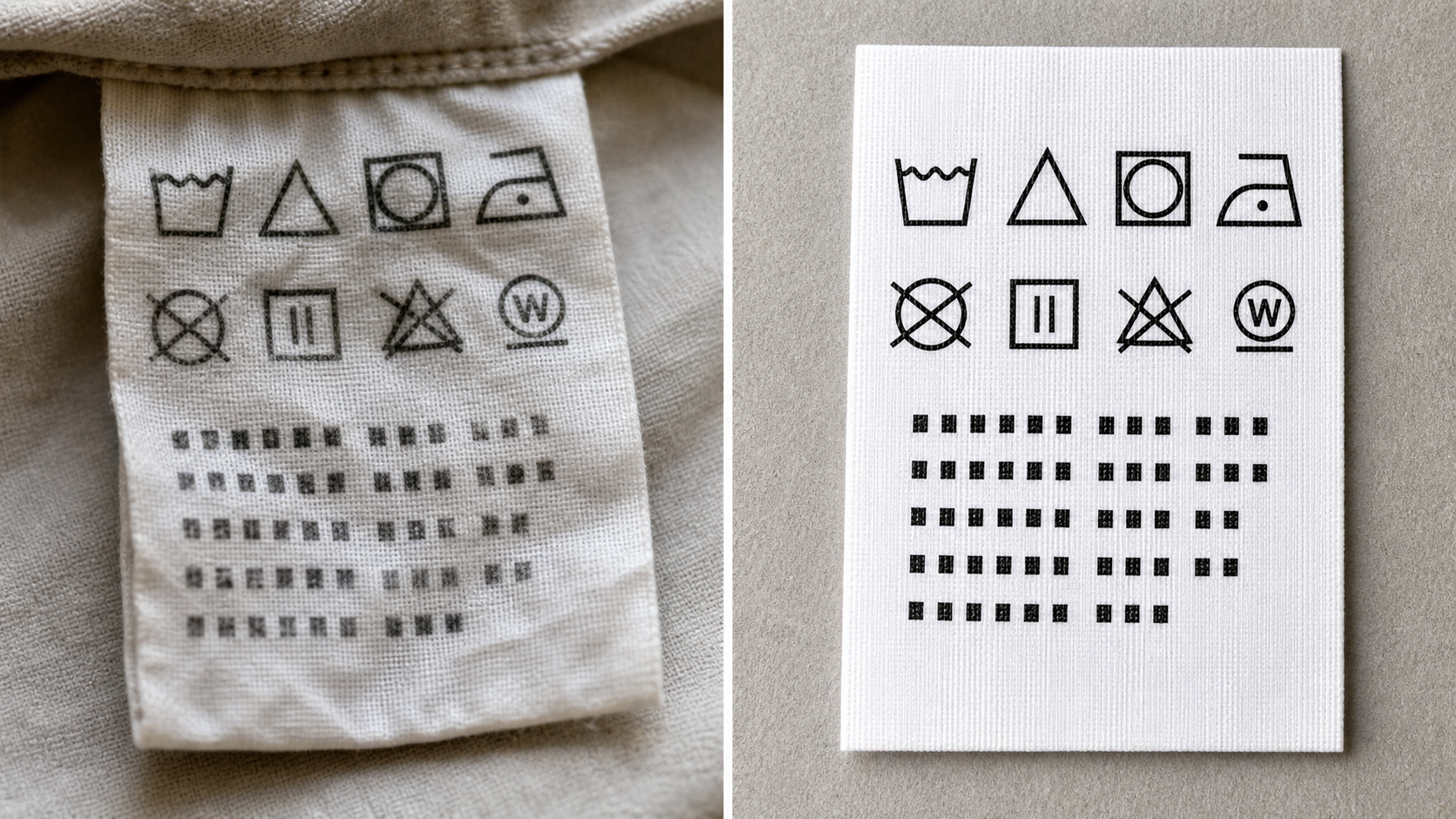
Once you have the best available photo, run a light cleanup pass. The goal is readability, not beauty. A care label image can look plain, gray, and clinical if the text becomes easier to verify.
Start by cropping away distractions. Remove most of the garment fabric, fingers, table edges, and hanger parts. Keep enough margin around the label so the text is not clipped, but make the label fill most of the frame. If the image is very large, crop first and then resize. ConvertAndEdit's image resize tool is useful when you need a consistent review size across a batch without making files unnecessarily large.
Next, straighten the label. OCR engines prefer horizontal baselines. A label tilted five degrees might still be readable to a human, but tiny care instructions become much harder to parse when each line slopes. If the label is folded, straighten the longest text block rather than the outer edge of the fabric.
Then adjust brightness and contrast conservatively. Increase contrast until gray letters separate from the label material, but stop before thin strokes break apart. If the label is white and the photo is yellow from indoor light, a mild correction can help. Avoid extreme sharpening; it often creates dark halos that OCR reads as punctuation or extra characters.
If the photo is noisy, compression should come after OCR prep, not before. Heavy compression can smear tiny letters and turn care symbols into blocks. Use image compression after you have saved a readable master or after OCR has been completed. For listing thumbnails, a compressed copy is fine. For evidence and extraction, keep a cleaner version.
For images in formats that cause problems in your listing system, convert them once and keep the naming consistent. The image converter can help standardize formats when a mix of HEIC, PNG, JPEG, and WebP files arrives from different phones.
OCR Setup: Crop for the Question You Need Answered
A common mistake is asking OCR to read the entire care label photo at once. Laundry labels often contain brand codes, multilingual fiber content, country information, washing instructions, RN numbers, and care symbols. If all of that is packed into one image, the output may be technically impressive but operationally messy.
Instead, crop according to the question you need answered.
If you need material composition, crop the fiber content block. If you need washing limits, crop the care instruction block. If you need a style identifier, crop the product code area. If you need everything for archival support, keep the full image too, but run OCR on the relevant sections separately.
Use image OCR on clean crops and compare the result with the original image before entering listing fields. OCR is an assistant for transcription, not a replacement for review. It is especially important to verify numbers, percentages, and fabric names that look similar. "Modal" and "model" are very different in a garment listing. "Polyamide" can be misread when the label is worn. Percentages can shift if a faded 8 becomes a 3.
For care symbols, do not expect ordinary OCR to reliably translate icons. A wash tub, triangle, circle, square, and iron symbol each carry meaning, often modified by dots, bars, or crosses. If the listing needs detailed care instructions, use the image as reference and enter the meaning manually based on your team's care-symbol guide.
A Field Checklist for Resale Staff
A short checklist keeps quality from depending on memory. Print it near the intake station or add it to your listing preparation notes.
Capture checklist
- Label is pulled flat and fully visible.
- Lighting is even, with no bright glare over text.
- Camera is parallel to the label.
- One full-label photo is captured.
- Dense text has a closer second photo.
- Both sides are photographed when relevant.
- File name or folder connects the image to the garment SKU.
Cleanup checklist
- Image is cropped to the label or the needed text block.
- Text lines are straight enough for review.
- Contrast is improved without crushing thin letters.
- File format is compatible with the listing system.
- A readable master is kept before heavy compression.
- OCR output is checked against the image.
- Uncertain fields are flagged instead of guessed.
Listing verification checklist
- Fiber percentages match the label.
- Care instructions are written in plain buyer-friendly language.
- Dry-clean, hand-wash, heat, bleach, and tumble-dry limits are checked.
- Country of origin is entered only if visible.
- Size information is not copied from the care label unless it is clearly present.
- Missing or unreadable labels are disclosed according to your shop policy.
The last point matters. A missing label is not the same as a clean label with no information. If the garment has no care label, say so in the internal notes and, where appropriate, in the listing. Guessing fabric content from feel may be acceptable for internal sorting, but it should not be presented as label-confirmed data.
File Naming That Survives a Busy Intake Day
OCR cleanup fails operationally when files become detached from garments. A care label photo named IMG_4821.jpg is not helpful after lunch if twenty black dresses were photographed that morning.
Use a simple pattern that ties each label image to the item record:
| File type | Example name | Purpose |
|---|---|---|
| Full garment photo | SKU-1048-front.jpg | Visual identification |
| Care label overview | SKU-1048-care-label-full.jpg | Archive and buyer support |
| Fiber crop | SKU-1048-care-fiber-crop.jpg | OCR for material fields |
| Care crop | SKU-1048-care-instructions-crop.jpg | OCR or manual care entry |
| Final listing image | SKU-1048-label-listing.jpg | Optional public listing image |
Keep names boring and predictable. Avoid staff initials, vague terms, and platform-specific names unless they are already part of your item ID system. If the garment has multiple labels, add label-1, label-2, or a location such as side-seam and neck.
When images must be combined into a review packet, convert label photos and product shots into a simple PDF. The image to PDF tool is useful for internal records, condition review, or consignor communication where a single file is easier than a folder of loose images.
When to Publish the Label Photo
Not every care label image belongs in the public listing. Some marketplace categories benefit from it; others become cluttered if every listing includes multiple tag close-ups. Decide based on buyer risk and item value.
Publish or include the label image when:
- The garment is high value or fabric-sensitive.
- The material claim is a major selling point.
- The item is vintage and label details support authenticity.
- Care requirements are unusual.
- The size or country of origin is likely to be questioned.
- The listing uses a premium marketplace where buyers expect detail shots.
Keep the label image internal when:
- The label is unreadable and would confuse buyers.
- The image contains previous owner marks or private alterations.
- The listing already has enough supporting detail.
- The label photo is only needed for staff verification.
If you do publish it, clean it for clarity but do not alter the meaning. Do not remove fiber content, change apparent text, or edit away warnings. Cosmetic cleanup is fine; factual alteration is not.
Handling Multilingual Labels Without Making a Mess
Many garments include several languages on one label. OCR may return a long block that mixes English, French, German, Italian, Spanish, Japanese, Korean, or Chinese text with symbols and codes. The result can be too noisy for quick listing entry.
A better approach is to select the language block you need. For an English-language listing, crop the English care instruction block if present. If there is no English block, use the symbols and material percentages, then write a conservative plain-language care note.
For fiber content, percentages often appear in repeated language blocks. Verify that the percentages are the same across blocks before copying. If one block is damaged, another may be clearer. For example, the English line may be folded, while the French or German line still shows the same numbers and fiber terms.
Do not over-translate specialist terms unless your team is sure. Some fabric names are international, but others vary by region. A cautious listing phrase such as "fiber label indicates a viscose blend" is better than a confident but incorrect claim.
Dealing With Faded, Cut, or Missing Labels
Some garments arrive with labels that are faded, cut short, or removed. OCR cannot recover text that is not visible. In these cases, the cleanup goal changes from extraction to documentation.
For faded labels, try a gentle contrast increase and a black-and-white version, then compare. Sometimes grayscale improves readability because it removes yellow lighting and colored fabric distractions. Sometimes it makes the text worse. Keep whichever version is easier for a human to inspect.
For cut labels, photograph the remaining edge and any secondary tags. A partial RN number, brand code, or fiber percentage may still be useful internally. Do not invent the missing part. If the label says 70% woo..., that might be wool, but the public listing should not present the full fiber content as confirmed unless another tag verifies it.
For missing labels, take a photo of the empty seam area only if your operation needs evidence. Otherwise, note care label missing in the item record and move on. Time spent trying to extract nonexistent information is usually better spent improving the main listing photos and measurements.
A Small Decision Table for Listing Language
Use this table to keep listing copy consistent when label confidence varies.
| Label condition | Internal note | Public listing language |
|---|---|---|
| Clear label, OCR verified | Label confirms 100% linen | Material: 100% linen |
| Clear label, manual read | Manual read, no OCR issue | Care label lists 100% linen |
| Partly faded but key data visible | Fiber visible, care partly unreadable | Material label indicates linen; some care text is faded |
| Cut label with incomplete data | Partial fiber label only | Care label is partially cut; material not fully confirmed |
| No label | Care label missing | Care label missing if relevant to buyer expectations |
| Symbols only | Care symbols photographed | Plain care summary only if manually verified |
This is not legal advice and it is not a substitute for marketplace policy. It is a practical way to avoid turning uncertain visual evidence into overconfident product copy.
Packaging Images for Review or Consignor Approval
Some resale teams send item records to consignors, managers, or remote listers before publishing. Loose image folders can become difficult to review, especially when each garment has front, back, detail, measurement, flaw, and care label photos.
For a compact review pack, place the garment overview first, then label images, then flaw images. If you need one file per item, use image to PDF. If you need one packet for a group of items, merge separate item PDFs with a PDF merge tool such as PDF merge. Keep the order consistent so reviewers know where to look for care details.
A good review packet does not need elaborate design. It needs predictable order, readable images, and file names that match the item records. If a remote lister sees SKU-1048-care-fiber-crop.jpg inside the packet and the spreadsheet row is also SKU-1048, fewer mistakes happen.
Quality Control: Review a Sample, Not Every Pixel
For small batches, review every OCR result. For larger batches, add a sampling habit. Check a percentage of completed listings against their care label images before publication. Increase the sample size when new staff are trained, when lighting changes, or when a batch contains many delicate fabrics.
A useful quality-control pass asks five questions:
- Does the public material field match the label image?
- Are percentages copied correctly?
- Are care restrictions captured without exaggeration?
- Is uncertainty described honestly?
- Is the label image stored where support staff can find it?
Track repeated errors. If staff often misread elastane as elastane blend without a percentage, revise the listing template. If OCR often drops percentage signs, teach reviewers to compare every number. If glare appears in most photos from one station, fix the light source rather than correcting each image individually.
Tool Choices for a Lean Label System
You do not need a complex software stack for this job. A practical setup can be small:
- Phone camera for capture.
- A shared folder organized by SKU or intake date.
- Resize image for consistent review dimensions.
- Convert image for standardizing formats from different devices.
- Image OCR for extracting readable text from prepared crops.
- Compress image for listing-ready copies after readable masters are stored.
- Image to PDF for review packets and consignor records.
The important part is the order. Capture cleanly, crop and correct lightly, run OCR on the most relevant text block, verify, then compress or package. If compression or format conversion happens too early, you may damage the very details you need.
Example: Processing a Silk Blouse Label
Imagine a cream silk blouse arrives for resale. The main garment photos look good, but the care label is tucked into a side seam and printed in pale gray.
The intake person pulls the label out, places a gray card behind it, and takes two photos: one full label and one close crop of the fiber and care lines. The first close photo has glare, so they rotate the garment slightly and retake it with softer side light.
During cleanup, they crop the dense text block, straighten it slightly, and increase contrast just enough to separate the letters. OCR returns a mostly correct result but reads Do not tumble dry as Do not tumble day. The reviewer catches the error because the image is clear. The listing is entered as silk with a delicate care note, and the original full-label photo stays in the SKU folder.
This is the standard you want: not magical automation, just fewer preventable mistakes.
Final Pre-Publish Checklist
Before a garment listing goes live, run a compact final check:
- The care label image is connected to the correct SKU.
- Material and care fields match visible label evidence.
- OCR errors have been corrected manually.
- Missing or damaged label issues are noted honestly.
- Public label photos, if used, are readable and not misleading.
- Internal master images are retained before compression.
- Review packets are ordered consistently when sent outside the listing team.
Laundry care label OCR cleanup is a narrow task, but it improves a surprisingly large part of resale operations. It reduces guessing, supports better buyer expectations, and gives staff a shared standard for handling uncertain information. The best system is not complicated: take boring photos, clean them lightly, crop for the question, verify the OCR, and preserve the evidence. For resale teams handling real garments under real time pressure, that is enough to make listings more accurate and easier to defend.